
Atkreipkite dėmesį, kad šis tinklaraščio įrašas buvo paskelbtas 2011 m. sausio mėn., todėl, priklausomai nuo to, kada jį skaitysite, tam tikros dalys gali būti pasenusios. Deja, ne visada galiu atnaujinti šiuos įrašus, kad užtikrinčiau informacijos tikslumą.
Creating a desktop application that allows users to drag and drop files or other data formats to the application is not only cool, but could be really user friendly as well. Implementing this feature in Java is quite easy as well.
This is done by connecting an AWT Component to a DropTargetListener, using a DropTarget. Below is a brief code example on how this could be done.
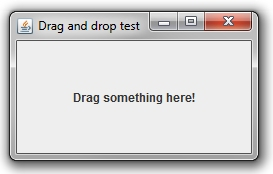
public class DragDropTestFrame extends JFrame {

    private static final long serialVersionUID = 1L;

    public static void main(String[] args) {

        // Create our frame
        new DragDropTestFrame();

    }

    public DragDropTestFrame() {

        // Set the frame title
        super("Drag and drop test");

        // Set the size
        this.setSize(250, 150);

        // Create the label
        JLabel myLabel = new JLabel("Drag something here!", SwingConstants.CENTER);

        // Create the drag and drop listener
        MyDragDropListener myDragDropListener = new MyDragDropListener();

        // Connect the label with a drag and drop listener
        new DropTarget(myLabel, myDragDropListener);

        // Add the label to the content
        this.getContentPane().add(BorderLayout.CENTER, myLabel);

        // Show the frame
        this.setVisible(true);

    }

}
Secondly we create a new instance of our DropTargetListener, and connect it to our label via DropTarget.
    // Create the drag and drop listener
    MyDragDropListener myDragDropListener = new MyDragDropListener();

    // Connect the label with a drag and drop listener
    new DropTarget(myLabel, myDragDropListener);
Afterwards we implement our MyDragDropListener class.
class MyDragDropListener implements DropTargetListener {

    @Override
    public void drop(DropTargetDropEvent event) {

        // Accept copy drops
        event.acceptDrop(DnDConstants.ACTION_COPY);

        // Get the transfer which can provide the dropped item data
        Transferable transferable = event.getTransferable();

        // Get the data formats of the dropped item
        DataFlavor[] flavors = transferable.getTransferDataFlavors();

        // Loop through the flavors
        for (DataFlavor flavor : flavors) {

            try {

                // If the drop items are files
                if (flavor.isFlavorJavaFileListType()) {

                    // Get all of the dropped files
                    List files = (List) transferable.getTransferData(flavor);

                    // Loop them through
                    for (File file : files) {

                        // Print out the file path
                        System.out.println("File path is '" + file.getPath() + "'.");

                    }

                }

            } catch (Exception e) {

                // Print out the error stack
                e.printStackTrace();

            }
        }

        // Inform that the drop is complete
        event.dropComplete(true);

    }

    @Override
    public void dragEnter(DropTargetDragEvent event) {
    }

    @Override
    public void dragExit(DropTargetEvent event) {
    }

    @Override
    public void dragOver(DropTargetDragEvent event) {
    }

    @Override
    public void dropActionChanged(DropTargetDragEvent event) {
    }

}
In the drop method we loop through all the different data formats (since it's possible to drop multiple items on the label).
// Loop through the flavors
for (DataFlavor flavor : flavors) {

    // If the drop items are files
    if (flavor.isFlavorJavaFileListType()) {

        // Get all of the dropped files
        List files = (List) transferable.getTransferData(flavor);

        // Loop them through
        for (File file : files) {

            // Print out the file path
            System.out.println("File path is '" + file.getPath() + "'.");

        }

    }

}
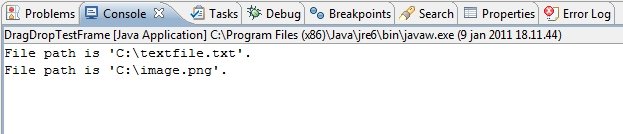
Launching the application and dropping files to the JFrame will show the following output.
Pretty easy. This application can of course be extended to support other data flavours, such as text, images and even other Java Components.
More information about drag and dropping in Java can be found in the Introduction to DnD tutorial.
