
이 블로그 게시물은 2011년 2월에 게시되었으므로, 읽는 시점에 따라 일부 내용이 최신이 아닐 수 있습니다. 안타깝게도 정보의 정확성을 보장하기 위해 게시물을 항상 최신 상태로 유지할 수는 없습니다.
Here is the deal - if you ever need to load in external JavaScript into your page, you should always do this at the very bottom of your page. Why? Because loading scripts halts the browser of presenting the page to your visitor.
Today, it's widely accepted that a fast response time of your site, gives a better user experience. Even though more and more sites are using AJAX to load in content, it is not always possible to load all resources a page needs in order to function properly (such as JavaScript or CSS) through AJAX.
A default web page works in a synchronous manner, meaning when loading in scripts, it stops and waits for the server to send back a reply (or the browser does a timeout) before continuing. If the server delivering the script has a long response time, so will your page.
A simple experiment
As a simple experiment, I created a very basic HTML page - as seen below.
<html>
    <head>
        <title>blog.christoffer.online script loading test</title>
        <script type="text/javascript">
            var started = new Date().getTime();
        </script>
        <script type="text/javascript" src="http://www.this-domain-does-not-exist-4.org"></script>
        <script type="text/javascript"">
            alert('code 1 executed after ' + (new Date().getTime()-started) + " ms!");
        </script>
    </head>
    <body>
        <p>page body</p>
    </body>
</html>
The page has three <script> tags. The first script simply declares and initiates a variable with the current timestamp.
<script type="text/javascript">
   var started = new Date().getTime();
</script>
The second calls on an external script from a domain that does not exist.
<script type="text/javascript" src="http://www.this-domain-does-not-exist-4.org"></script>
The third script presents the loading time.
<script type="text/javascript"">
   alert('code 1 executed after ' + (new Date().getTime()-started) + " ms!");
</script>
When loading this page (in Firefox) for the the first time locally (meaning no web server, just drag and dropped the HTML file from my desktop, directly to the browser), the page was not displayed immediately. Instead I could read this in the status field.

After few moments, the alert box appeared and the page was displayed.
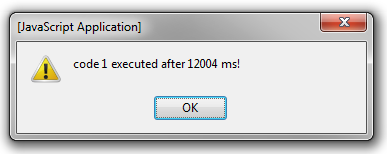
This meant it took around 12 seconds until I saw my own page I had on my own computer. Even though this is an extreme case (since I deliberately specified a domain that does not exist) it's not that far fetched that the real server hosting your server could go offline, or still have a long response time. This proves that the presentation of your page is actually based on the time of loading external scripts.
In the above experiment I used Firefox 3.6, Chrome 10 and Internet Explorer 8. All browsers shared the same problem.
Moving your external call to the end of the page
If you were to move down your script that calls on the external resource as the very bottom of your page (just before the
</body> tag) the browser will serve the page to the user, then start to load in the external script.
<html>
    <head>
        <title>blog.christoffer.online script loading test</title>
    </head>
    <body>
        <p>page body</p>
        <script type="text/javascript" src="http://www.this-domain-does-not-exist-11.org"></script>
    </body>
</html>
This is even a recommended by Google to customers using their Google Analytics solution:
Implementing the code Once you find the code snippet, copy and paste it into the bottom of your content, immediately before the tag of each page you are planning to track.
