Ņem vērā, ka šis raksts ir no 2010. gada oktobra — dažas detaļas var būt vecākas, bet lasīt joprojām interesanti!
Ever since my boss at my current work mentioned the all mighty Hessian binary protocol, I have been heads of heels of using it everywhere, not to mention in my Android development. Not because it's really fast, but it's also really easy to use.
Since both Android applications and Hessian are both written in Java, there had to be - or at least it should be possible - to use Hessian in Android. After Googling the web I found several solutions and comments concerning this topic.
Some people recommended to download the original Hessian library and modified it to the Android platform, while others pointed towards the Hessdroid library. I tried both but after several hours to get it working as I wanted, I gave up and went back to Google.
What I found was the Exadel Flamingo framework by the company Exadel which is a framework to create rich Internet applications on mobile platforms, such as the iPhone, J2ME and Android. The framework is under GNU Lesser General Public License.
To get it up and working you first have to login (you can login with your OpenID credentials) and download exadel-flamingo-2.2.0.zip. Inside the ZIP-archive you will find the flamingo-android-hessian-client-2.2.0.jar (you might want to check if there is a later version though).
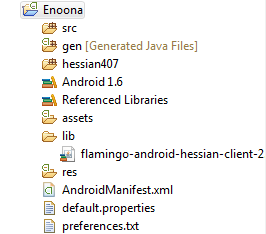
If you use Eclipse for your Android development, all you have to do is copy "flamingo-android-hessian-client-2.2.0.jar2 into the project somewhere.
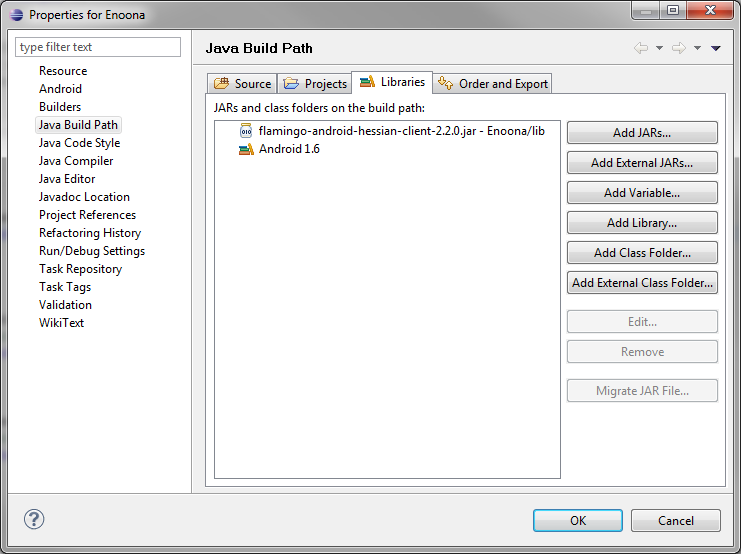
Then in the project's libraries:
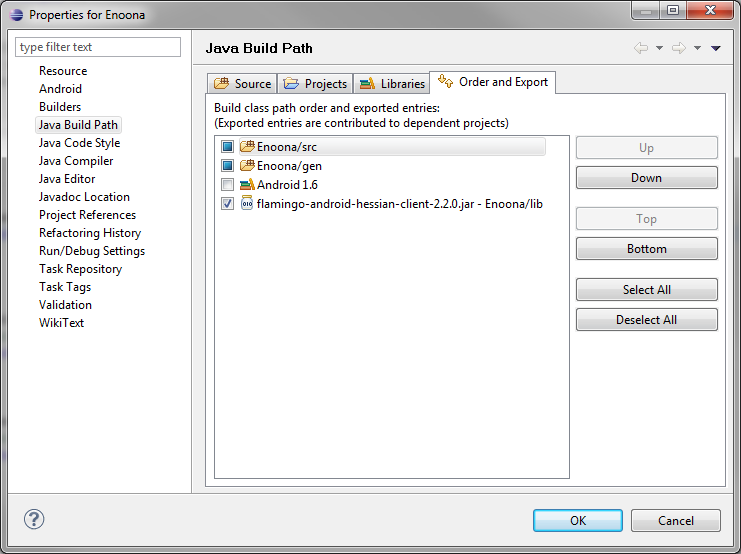
and finally also in your export path to ensure it will included in your applications APK: