
Xin lưu ý rằng bài đăng trên blog này được xuất bản vào tháng 2 năm 2011, vì vậy tùy thuộc vào thời điểm bạn đọc, một số phần có thể đã lỗi thời. Rất tiếc, tôi không thể luôn cập nhật đầy đủ các bài đăng này để đảm bảo thông tin luôn chính xác.
A few months ago, I wrote how it is possible to run Checkstyle as an automatic JUnit test. PMD (don't shoot the messenger!) is another great static code analysis tool. We use both at work to continuously check for smelly code and other code problems.
So why use both PMD and Checkstyle? Simply because they complement each other in a great way. I usually say that PMD checks what code is written, while Checkstyle checks how the code is written. PMD can check for possible bugs, over complicated methods, duplicated and even unused code.
Unfortunately, PMD is not as easy to integrate into a JUnit test as we did with Checkstyle. In order run it as an automatic test, we actually had to run it's main method with our arguments and hooking the output streams to capture any error reports.
Here is an example using Eclipse
First of all, we download the latest version of PMD (at the current time it would be
pmd-bin-4.2.5.zip) and add the pmd-4.2.5.jar, asm-3.1.jar and the jaxen-1.1.1.jar archives (located in the /lib/ folder) as libraries to the Eclipse project. While we are there, we also add the JUnit library as well.
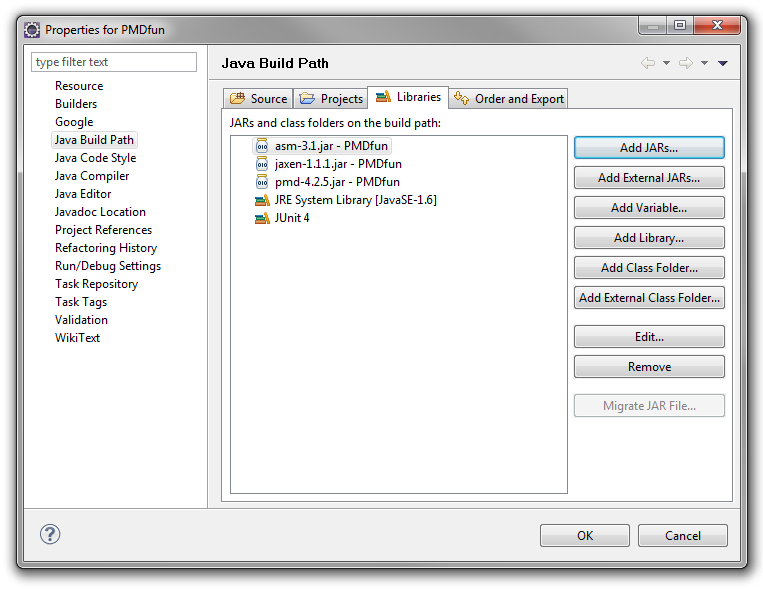
Afterwards, we create a new JUnit test case. The code of the test is below. Please read the code comments for additional information what's being done.
public class PMDTest {

    @Test
    public void testPMDSrc() throws Exception {
        doPMD("./src/");
    }

    private void doPMD(String sourceFolder) throws Exception {

        // A friendly message informing we are going to start the test
        System.out.println("Starting PMD code analyzer test on directory '" + sourceFolder + "'..");

        // Init the arguments
        String filePath = new File(sourceFolder).getAbsoluteFile().toString();
        String outputType = "text";
        String unusedString = "this is an unsued variable";
        String rules = URLDecoder.decode(PMDTest.class.getResource("pmdrules.xml").getFile().toString(), "UTF-8");

        String[] arguments = new String[] { filePath, outputType, rules };

        // Save the streams to be restored after the test
        PrintStream out = System.out;
        PrintStream err = System.err;

        // Create our new streams to be hooked
        ByteArrayOutputStream baosOut = new ByteArrayOutputStream();
        ByteArrayOutputStream baosErr = new ByteArrayOutputStream();

        PrintStream psOut = new PrintStream(baosOut);
        PrintStream psErr = new PrintStream(baosErr);

        // Hook the streams with our own
        System.setOut(psOut);
        System.setErr(psErr);

        // Star the actual PMD test
        PMD.main(arguments);

        // Restore the default streams
        System.setOut(out);
        System.setErr(err);

        // Close everything up
        psOut.close();
        psErr.close();
        baosOut.close();
        baosErr.close();

        // Organize the output from the PMD test
        String linesOut[] = baosOut.toString().split("\r?\n");
        List rowsOut = new ArrayList();

        for (String line : linesOut) {
            if (line.length() > 0 && line.indexOf("suppressed by Annotation") == -1 && line.indexOf("No problems found!") == -1 && line.indexOf("Error while processing") == -1) {
                rowsOut.add(line);
            }
        }

        System.out.println("Found " + rowsOut.size() + " errors");
        for (String error : rowsOut) {
            System.out.println(error);
        }

        if (baosErr.toString().length() > 0) {
            System.out.println("Errors:");
            System.out.println(baosErr.toString());
        }

        // JUnit asserts
        Assert.assertTrue(rowsOut.size() + " errors
" + rowsOut.toString(), rowsOut.isEmpty());
        Assert.assertTrue(baosErr.toString(), baosErr.toString().trim().length() == 0);

    }
}
Before we can run the test, we need to create an XML file with PMD rules called pmdrules.xml (as specified in the code above). Below is an example of such a file. You can create your own set of rules to specify what checks you would like to perform. Here is the set of rules we are using in this example.
<?xml version="1.0"?>
<ruleset name="customruleset">
     <rule ref="rulesets/unusedcode.xml/UnusedLocalVariable"/>
</ruleset>
Now we can run our test.
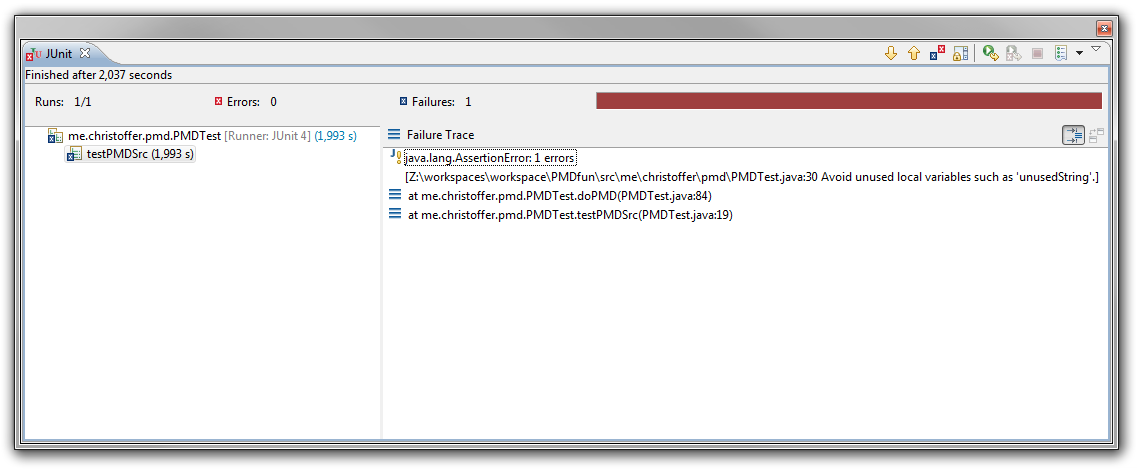
Oh, look - PMD found an unused varible in my code. How clumsy of me ;-)
